
Controls
One public session shows a hotbar labeled Telekinesis on 1, Debris Barrage on 4, and Mind Crush on X. That is a loadout, not a manual for every power.
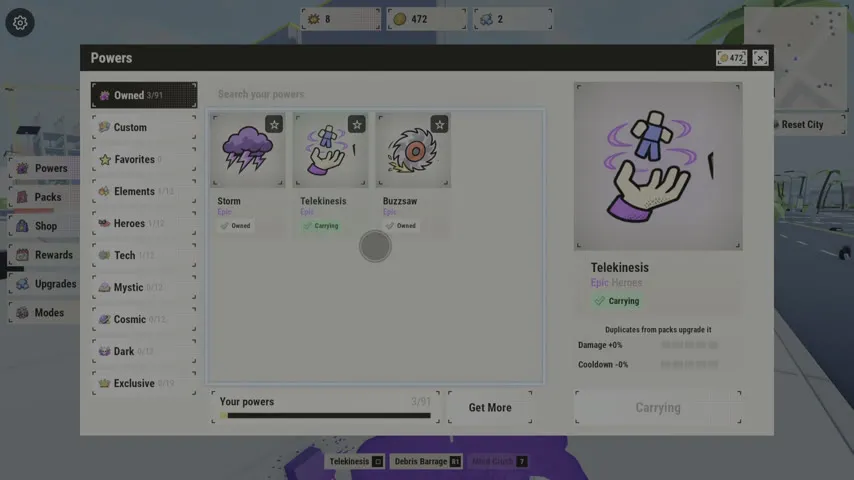
What the clip labeled
For the experience’s active bindings, open the Controls tab in Settings. Roblox’s general PC defaults include WASD or arrow-key movement and Space to jump, but the gameplay recording does not establish a complete binding list for this experience. The attack line that is actually on screen is the controller sentence “Aim at the crowd and press L1.” For mouse and keyboard, follow the bindings actually displayed by the client’s Controls tab.
The hotbar in that recording is specific. Slot 1 was Telekinesis. Slot 4 was Debris Barrage. X was Mind Crush. If your starter carry is Storm or Buzzsaw, your slot 1 text will differ. Do not tape “1 = Telekinesis” onto a guide as if the game locked it.
The settings window
The gear opens a row of tabs: Settings, Controls, Co-op, Ragdolls, Codes, Feedback, Modes. Inside Settings the visible rows include hostiles, Map Size, HUD Size, Music, and Sound Effects. Hostiles off is the one the group confirmed in writing on 21 Nov. The Controls tab itself was not the frame we froze, so I am not listing a rebinding grid.
The optional Custom Loadouts pass provides a separately documented control feature: its official description says you can assign owned moves to E, F and R, choose a power’s passive, and save three loadouts (Roblox game-pass API · 1 source, checked 22 Nov 2026). Those are the pass’s customization slots, rather than a universal default attack binding.
Phone and tablet controls were not in the footage. A phone layout is not established by this desktop recording; use the on-screen prompts for your device. Redeeming a code uses the same Codes tab described on how to redeem. The opening loop is on how to play.
FAQ
What is the attack button on PC?
The clip shows a controller L1 prompt and a hotbar. It does not print a single PC attack key for every power.
How do mobile controls work?
They were not shown. Use the on-screen prompts and the Settings Controls tab; the reviewed footage covers a different device.
Sources
- Playing Defeat ragdolls for powers — checked 2026-11-22
- Yukky Toast group announcements — checked 2026-11-22
- Roblox game-pass prices and descriptions · 1 source — checked 2026-11-22